Best Practices for PSA Software Implementations
When PSA implementations fail, it’s not because buyers chose the wrong software. It’s because they were underprepared before they even spoke to a vendor. The wrong selection can cost an organization millions in wasted implementation fees, lost productivity, and a painful re-implementation two years later. The right selection, made with discipline and the right information, is one of the highest-leverage investments a professional services firm can make. These are the seven steps to avoiding a failed implementation.
01 Start with use cases, not vendor demos
Define requirements before any vendor conversation
- Before contacting any vendor, document your primary use cases with specificity – your service delivery models (T&M, fixed fee, milestone, outcome-based), where your project lifecycle breaks down today, your ERP/CRM stack, and billing complexity.
- Plan 3-5 years ahead. The most common mistake buyers make when evaluating vendors is focusing on today’s needs and looking forward a maximum of 12-18 months into the future. Then, even if a PSA implementation “succeeds,” buyers outgrow the system and are back on the market within two years. A PSA that is unable to scale beyond the first year’s requirements is not a successful implementation.
- Skip the long-form RFP. Vendors increasingly feed RFPs into AI models and return generated answers. Instead, ask vendors to demonstrate how they handle your specific scenarios and multi-step process changes.
- Well-documented use cases do more than inform your search – they signal seriousness to vendors, galvanize internal stakeholders, and force the organization to rethink friction-laden processes before locking them into a new system.
02 Match vendor to your vertical and scale
Feature lists are the wrong frame – fit is what matters
- Vertical fit. PSA is a market where vertical fit increasingly matters. A platform purpose-built for government contracting (Deltek) will handle compliance, cost accounting, and DCAA requirements in ways that a platform designed for CSPs and MSPs (Rev.io, ConnectWise) will not – and vice versa. Select your prospective suppliers based on how well they demonstrate support for your use case scenarios.
- Size matters. Finding the right cultural fit for the buyer can be as important as assessing functionality. Smaller vendors are often more accommodating and may be capable of delivering results faster. Conversely, larger suppliers with established systems integration relationships and a broader relationship with the buyer can be a better fit for organizations needing more. Sourcing external resources, support building and maintaining project momentum, and keeping implementation effort on track are some of these bigger needs.
- AI and review sites are useful only as a starting point. Roughly 70–80% of buyers now use AI in vendor research. AI can quickly surface a longlist, but outputs reflect vendors’ marketing more than operational reality. A five-star review from a 50-person agency is nearly meaningless for a 1,000-person firm evaluating the same platform.
- Talk to reference accounts in depth. If you are solely relying on a vendor’s standard pitch deck for information, then you are setting yourself up for failure. Rely on references, industry analysts, and third-party research for information.
03 Understand the real cost before you sign
License fees are typically the smallest part of total spend
| Tier | Users | Year-One Cost | Go-Live Time |
|---|---|---|---|
| SMB | 5–100 | $30K–$150K | 5–12 weeks |
| Midmarket | 25–500 | $150K–$600K | 3–9 months |
| Midmarket+ | 500–1,000+ | $500K–$1.5M | 6–12 months |
| Enterprise | 1,000+ | $1.5M–$6M+ | 1–3 years |
- Moving between tiers is expensive. SMB to midmarket can be a 4–8x cost jump. Midmarket to enterprise can be another 5–10x leap. The jump happens because more workflows, more integrations, and more change management are required – not just more licenses.
- The most consistently underestimated costs: data migration and cleanliness, integration scope creep, change management investment, and post-go-live stabilization – including the cost of running parallel systems.
- Associated platform costs (e.g. NetSuite, Certinia, SAP, and Workday) are vulnerable to cost creep due to unexpected costs tied to the core enterprise application platform. While these platforms bring certain benefits, they can also be the source of unexpected price increases.
04 Choose your systems integrator as carefully as your vendor
The SI selection is as consequential as the software selection
- Organizations routinely spend months evaluating PSA vendors, then two days selecting a systems integrator. This is a costly mistake. For midmarket and enterprise implementations, SI costs are typically 2-3x the first-year license fees.
- Selecting the wrong SI (e.g., one without PSA domain expertise in your industry, without process optimization capability, or without genuine experience with your chosen software) can lead to dramatically negative outcomes regardless of how strong the product is.
- Ask prospective SIs for demonstrated PSA experience in your industry. Interview the specific technical leads and project managers who will work on your engagement. Ask for references from comparable implementations.
05 Evaluate for flexibility and innovation, not just features
Data model rigidity and vendor trajectory matter more than today’s checklist
- Data model flexibility matters. Tightly coupled applications with rigid entity structures (projects, resources, timesheets, billing, etc.) make it hard to adapt workflows as the business evolves. Leading services organizations weight data model flexibility and solution agility above absolute functionality.
- Run stress tests with realistic future data volumes. There is a wide gap in resource management and billing when requirements and volumes shift from today’s dozens of projects to tomorrow’s hundreds or thousands of complex, multi-service line, multi-year projects.
- Assess vendor innovation trajectory honestly. The AI era will produce new leaders and clear laggards in PSA. Not every vendor has the resources or foundation to remain relevant in three years.
06 Assess AI claims with healthy skepticism
Meaningful AI integration looks very different from dashboard features
- AI is present across nearly every PSA vendor roadmap, but buyers should probe deeply into what that actually means. Many implementations remain superficial: copilots on the margin, dashboards that surface data you could find yourself, and summary features that do not change how work gets done.
- The high-value AI use cases in PSA are workflow-native: staffing recommendations based on skills and availability, early risk identification in project delivery, dynamic capacity modeling, and automated revenue recognition. Ask vendors to demonstrate these specifically – not show you a chatbot.
- Demand explainability. Transparency, auditability, and reversibility are non-negotiable.
- Evaluate where each vendor’s AI investments are actually going. Vendors rebuilding their core data model to support AI-native workflows are in a fundamentally different position than those bolting LLM features onto a decade-old architecture. Ask directly: what percentage of your R&D investment is going into AI, and where specifically is it being applied?
- Be cautious about vendors that are not investing aggressively in AI right now. The market will bifurcate. In three years, the gap between AI-native PSA platforms and legacy systems will be material. Buyers who invest accordingly will increasingly be able to use their PSA system as a competitive differentiator through increased margin visibility and business scalability without increased headcount.
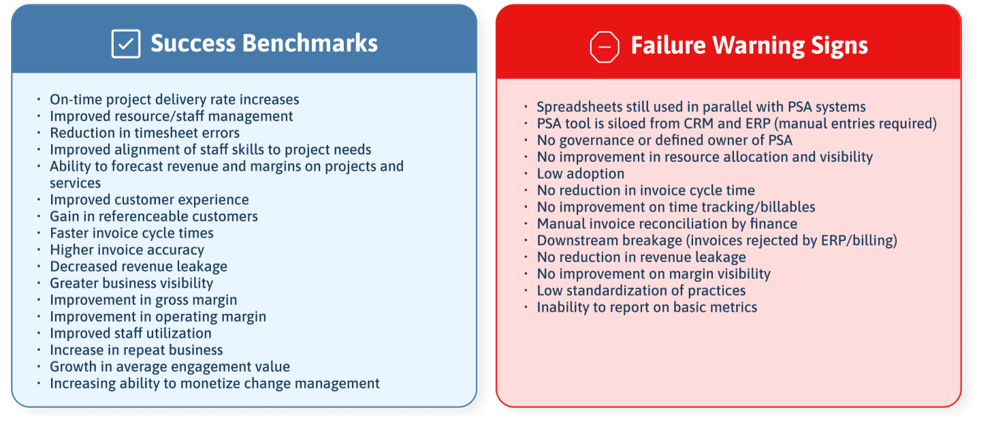
07 Success vs failure patterns to watch for
Most PSA implementations fail for predictable, avoidable reasons